AUTOMATION

Integrations

Run the engines from code. The calculations you use on screen are available to scripts in the browser, to your own systems over a REST API and to AI assistants over MCP, through one catalogue of engine functions.

Engine functions in the shared catalogue
27
OpenAPI version, generated from the catalogue
3.1
Tools exposed over MCP
50
API key scopes: read, write and run
3
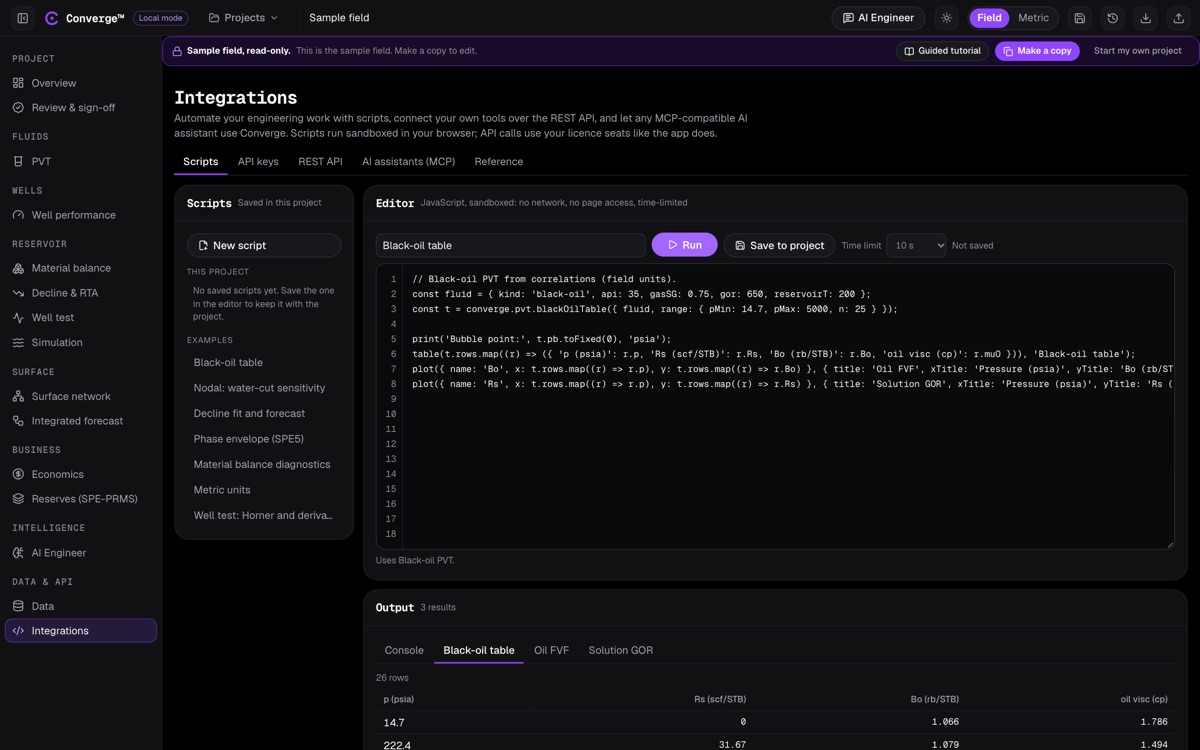
Converge scripting editor: a list of example scripts on the left, a JavaScript editor computing a black-oil table in the centre, and the output table of pressure, solution GOR, formation volume factor and viscosity below.
A worked example script computing a black-oil table, with its output as a table and plots.

WHAT IT DOES

The same engines, three ways in

Every Converge engine function is described once, in a catalogue that sets its inputs, outputs and units. The scripting editor, the REST API and the MCP server all call that catalogue, so a script, an integration and an AI assistant get exactly the numbers the screen shows.

Scripts are JavaScript, run in a fresh, locked-down browser worker each time: no network, no page access, no eval and no imports, with a time limit. They print, tabulate and plot, are saved with the project, and start from worked examples. The REST API serves an OpenAPI 3.1 specification generated from the catalogue, so the documentation cannot drift from the code.

The MCP server lets any MCP-compatible AI assistant list your projects, read them and run engine functions over Streamable HTTP. API calls authenticate with scoped personal keys and take a floating seat for their module, the same way the app does.
At a glance

  • JavaScript scripting in a sandboxed browser worker
  • Worked examples in field or metric units
  • print, table and plot output
  • Scripts saved with the project
  • REST API with an OpenAPI 3.1 specification
  • curl, Python and JavaScript snippets
  • Scoped personal API keys with expiry
  • 120 requests per minute per key
  • MCP server over Streamable HTTP
  • Projects exposed as MCP resources
  • One catalogue of 27 engine functions
  • Seats apply to API calls as in the app

KEY CAPABILITIES

Scripts, REST and MCP in detail

Scripting editor

Automate repeat calculations without leaving the browser.

  • JavaScript in a fresh, locked-down worker for each run
  • No network, no page access, no eval, no imports
  • 10-second time limit by default, 60 seconds at most
  • console, print, table() and plot() output
  • Scripts saved per project
  • Field units by default; one call switches to metric

Worked examples

Start from a script that already runs.

  • Black-oil table
  • Nodal water-cut sensitivity
  • Decline fit and forecast
  • SPE5 phase envelope
  • Material-balance diagnostics
  • Metric units and a well-test Horner and derivative

Engine catalogue

One description per function, used by all three routes.

  • PVT and equation-of-state functions
  • Well IPR, VLP and nodal
  • Material balance and decline
  • Well-test synthetic, Horner and derivative
  • Simulation, Buckley-Leverett, network solve and integrated forecast
  • Economics metrics and cash flow; data parsing and validation

REST API

Connect Converge to your own systems and data pipelines.

  • OpenAPI 3.1 specification at /v1/openapi.json, generated from the catalogue
  • List and run engine functions
  • List, read, save and delete projects, and their versions
  • Code snippets in curl, Python and JavaScript

Authentication and limits

Keys that you control, scoped to what they need.

  • Personal API keys sent as a Bearer token
  • Stored only as a hash and shown once
  • Scopes: projects:read, projects:write and engine:run
  • Expiry from 1 to 730 days, or none; up to 25 active keys per user
  • 120 requests per minute per key
  • API keys cannot sign off a review

MCP server

Let an AI assistant work with your Converge projects.

  • Streamable HTTP, JSON-RPC 2.0, stateless
  • The 27 catalogue functions, 21 read-only fluid-model tools, and project listing and reading
  • Saved projects exposed as resources
  • Works with any MCP-compatible client

WORKFLOW

From a script to an integration

  1. Try a worked example

    Open the scripting editor, run an example and read the table and plots.

  2. Write your own script

    Call any engine function, in field or metric units, and save the script with the project.

  3. Create an API key

    Choose the scopes and an expiry; the key is shown once.

  4. Call the REST API

    Read the OpenAPI specification and copy a curl, Python or JavaScript snippet.

  5. Connect an AI assistant

    Point an MCP-compatible client at the Converge MCP endpoint with your key.

VALIDATION

Rerun the benchmarks yourself

The benchmarks page publishes scripts for SPE1, PVT, well test, decline, material balance and NPV that anyone can rerun in their own account, through the same engine functions the API exposes.

Not built yet: other scripting languages (Python appears only as REST snippets), write access over MCP, webhooks, and network optimisation over the API. Well-test regression and deconvolution are not yet exposed over the API.

INPUTS AND OUTPUTS

What goes in, what comes out

Inputs

  • JavaScript scripts in the editor
  • JSON requests to the REST API
  • MCP tool calls from an AI assistant
  • Personal API keys with scopes

Outputs

  • Engine results as JSON
  • Tables and plots in the editor
  • Project data and versions
  • MCP tool results and resources

Exports

  • OpenAPI 3.1 specification
  • Scripts saved with the project
  • Project JSON through the API

FAQ

Integrations: common questions

What language are scripts written in?

JavaScript, run in a sandboxed browser worker with no network or page access and a time limit of 10 seconds by default, 60 at most.

Do scripts and the API use the same engines as the app?

Yes. Scripts, the REST API and the MCP server all call one catalogue of engine functions, so results match the screen.

How do I authenticate to the REST API?

With a personal API key sent as a Bearer token. Keys are scoped to projects:read, projects:write or engine:run, can expire, are stored only as a hash and are shown once.

Which AI assistants can use the MCP server?

Any client that supports MCP over Streamable HTTP. The server exposes 50 tools, including the engine functions and read-only fluid-model tools, and your saved projects as resources.

Is there an API specification?

Yes. An OpenAPI 3.1 specification at /v1/openapi.json, generated from the engine catalogue so it always matches the code.

Automate the calculations you repeat.